Welcome To SoftwarezCity :)

~ We Share | The Best ~
A site/blog where all your search comes to an end :D :p Everything's site, download games, software, tricks, scripts, mobile stuff and get tutorial videos and much more All free :).

Games

Download free full version games with an ease access.

Tricks/Tutorials

Solve you cyber problem with simple tweaks and tricks , like facebook photo verification , fb auto invites and much more.

Earning$$$

Get easy and working methods and tips for online earning. Start your earning now $_$.

Hacking

Get premium and tricky hacking methods + hacking tools and video tutorials . Learn hacking with fun :D .

Softwares

Download full version softwares for free here . Also get cracks for number of software with ease clicks .

Showing posts with label Tricks & Tutorials. Show all posts

How To Submit Blogger Sitemap To Google Webmaster Tools?


How To Submit Blogger Sitemap To Google Webmaster Tools?


To be successful in your blogging career you must have to generate decent organic traffic to your blog. By the term “organic traffic” I mean the traffic which comes to your blog through search engines like Google. If you are a new blogger then you should be aware with the Google Webmaster Tools. This is a great tool which is provided by Google itself. It is useful for bloggers and webmasters to get their blog or website index by the Google and it also help to improve our blog’s crawling rate.
You just need to verify your blog ownership in Google Webmaster Tools and then submit a simple sitemap. It is very important to submit blogger sitemap to Google in terms of SEO which tells Google about your blog and its content. Whenever you update your blog with new posts, your sitemap helps to index them easily in search engines. This is what we are gonna discuss in this post. Let see how to add blogger sitemap to Google Webmaster Tools.
How To Submit Blogger Sitemap To Google Webmaster Tools?

Submit Blogger Sitemap To Google Webmaster Tools

Below are some easy steps you have to go through in terms to submit your blogspot blog sitemap.
  • Sign in to Google Webmaster Tools.
  • Click on the blog title for which you want to add sitemap.
  • Click on Sitemaps button as shown below.

  • At the top right corner of the page, press Add/Test sitemap button.

  • Once you click the button, a small box will appear as shown in the screenshot below.


  • Add the below code in the text field.
atom.xml?redirect=false&start-index=1&max-results=500
This is the sitemap code for your blogger blog which you need to add.
  • Press “Submit Sitemap” button.
  • Refresh the page.
Congratulation! You have finished the process of submitting your blog sitemap.
Note: The above sitemap will work for 500 posts only. If you have more than 500 posts published in your blog, then you have to add one more sitemap. Whole procedure will be same but at this time you have to add this code.
atom.xml?redirect=false&start-index=501&max-results=500

Accept or Reject all Friend Requests on Facebook at Once


 Description
Accept or Reject all Friend Requests on Facebook at Once


First of all Install FST(facebook social toolkit)
Now visit : https://www.facebook.com/friends/requests/

Open FST and pick accept/reject tool.

Lastly click on 'Accept All/Reject All' in order to accept or reject all requests at once .

Friend Requests, Facebook, accept, reject, all, at, once, friends, friend, request, requests

Thanks for watching and also support us on Facebook @
http://facebook.com/tigerzplace
http://facebook.com/softwarezcity

Share it with your friends  ;)
Sharing is Caring ...

Allah Hafiz ♥

How to invite all your friends to like your facebook page

Description
How to invite all your friends to like your facebook page

Invite all your facebook friends to like you page just by 1 click .
In order to get the method working you will need an extension FST(facebook social toolkit):

How to invite all your friends to like your facebook page

  • Install it and you will get the icon on top right bar. 
  • Click it and you will get a whole bunch of options in which you have to select 'Invite your friends to like your page ' and you will get the dialog box there.
  • Enter your page ID, You can get that from about section of your page.
  • And set the time interval for invitation as 1. 
  • Click Invite friends and your done :D .
  • Invitation will start and when finish you will be notified .
That's all you need to do :) . More tutorials will be publish soon :)


Check this Video : Facebook Auto Liking
You may also like : Facebook Photo Verification
Enjoy

How to install Kali Linux on Android

Description

Installation of Kali on Android is really simple. You just need two apps and you're halfway done!

How to install Kali Linux on Android


Download Linux Deploy: http://adf.ly/1UsE43
Download VNC Viewer:http://adf.ly/1UsE43
https://play.google.com/store/apps/de...

Having problems?
Try using the Complete Linux Installer instead of Linux Deploy:http://adf.ly/1UsE43


You can also check out blog post @ HERE

FAQ:
- Can I easily revert back to my good ole' Android?
You're running Android all the time, this is just a connected image. Don't worry, this won't break your device.


Enjoy

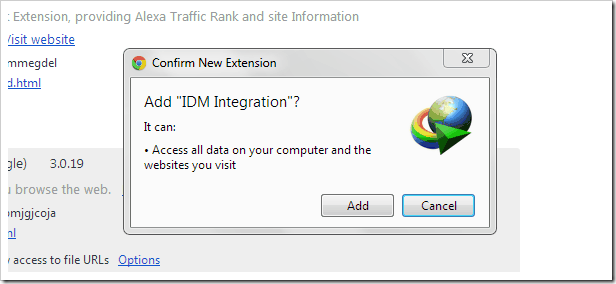
Idm does not show a video download panel [fixed]

A quick easy method for adding Idm download panel for videos. :) . Many of my friends and my page user ask me that "IDM does not show a video download panel" on facebook and some other site . So I searched for it and came to know that its because of the add-ons . SITE : http://getidmcc.com/

How To Change Facebook Theme

NetFrame Error Solved [Installed]

How To Get An Approved AdSense Account In 1 Hour

How To Get Google Adsense Account Free Without Any Website Or Blog

How To Unlock Or Reset Memory Card Password

Forward Port without accessing Router


Link1 | Youtube
Link2 | Dailymotion

How to add IDM Extensions to Chrome

How To View any user account password through cmd :D

Optimize BroadBand Internet Speed . Working Trick 100% !!!!

Bypass Facebook Photo Verification :D - 100% Working Method


Full Video Tutorial links:
link1 (youtube)
link2 (dailymotion)

How To Submit Blogger Sitemap To Google Webmaster Tools?

How To Add Keywords in Blogger Posts For Optimization?

Tricks to Increase Blog Traffic Using Google Webmaster Tools

Best Ways How To Protect Facebook Account from Hackers

If you are like millions out there, Facebook has become your no. 1 website on the Web. As you login to it every single day from many devices, be it from your mobile phone, computer, laptop and office workstation, there is a chance that you may leave your Facebook account on without logging out. If your account gets accessed by strangers, it’s going to open up a large can of worms, so you should seriously try to prevent unwanted access to your account.


Install Any Operating System From USB

bootable-usb-maker

Installing Windows/Linux/Ubuntu From USB
Installing Operating system from USB is more reliable and Fast than Optical Discs. And If you have netbook or notebook or pads then you have to install Operating System From USB Flash Drive because they don’t have Optical Discs Drive.
Installing Windows or Any Other OS from USB Flash Drive, Step By Step Guide With Pictures :   Click Here